Steam trading bot infrastructure: a practical guide for CS2 marketplaces
Steam trading bot infrastructure connects your marketplace to Steam accounts, inventories and trade offers. Here is how to plan the hosting, handle failures, and keep your application in sync from the first request to final settlement.
What you’ll take away
- Choose who operates accounts, hosting and recovery.
- Separate available inventory from items that are protected or reserved.
- Track requests, offers and settlement independently.
What does a Steam trading bot actually do?
A Steam trading bot is software that operates a Steam account to send, track and manage item trade offers. For a CS2 marketplace, the account can hold skins, request a deposit from a customer, or send a withdrawal. Your marketplace backend decides which trade should happen; the bot carries out the Steam side of that decision.
That distinction matters when choosing infrastructure. Reading an inventory, valuing a skin and moving that skin are separate capabilities. An inventory API does not, by itself, provide authenticated trade execution. A working trade script still needs persistent storage, recovery, monitoring and a way to communicate outcomes to your application.
This guide covers marketplaces that use bot accounts to hold and transfer items. In a peer-to-peer marketplace, the seller keeps the item until they trade with the buyer, so custody and trade execution have a different design. Neither model removes Steam’s item restrictions or the need to verify what happened.
Choose the hosting model before the server
Start with responsibilities. Who maintains the runtime? Who supplies Steam accounts and proxies? Who responds when a session expires or a trade has an uncertain outcome? A low server bill is only one part of the operating cost.
| Model | Your team handles | Best fit |
|---|---|---|
| Self-hosted | Accounts, servers, deployment, storage, updates, monitoring and incident response. | You need control over the stack and have someone available to operate it. |
| Hosted, your accounts | Your accounts and agreed network requirements, plus the marketplace integration and business rules. | You already have bot accounts and want a provider to run the bot infrastructure. |
| Managed bots | The marketplace integration, trade authorization and business rules; agree account access and recovery responsibilities with the provider. | You want accounts and infrastructure provisioned together. |
At SteamBotic, Hosting uses your Steam accounts and proxies. Managed includes bot accounts and a private proxy per bot. On-premises is available for your own infrastructure. The current bot hosting plans describe the commercial options; the setup walkthrough explains onboarding.
For a self-hosted deployment, size from measured work: active accounts, inventory size, trade activity, polling, database writes and retained history. Start with a small fleet and observe CPU, memory, storage and queue delay. There is no useful universal “bots per VPS” number without that workload.
The infrastructure behind a trade offer
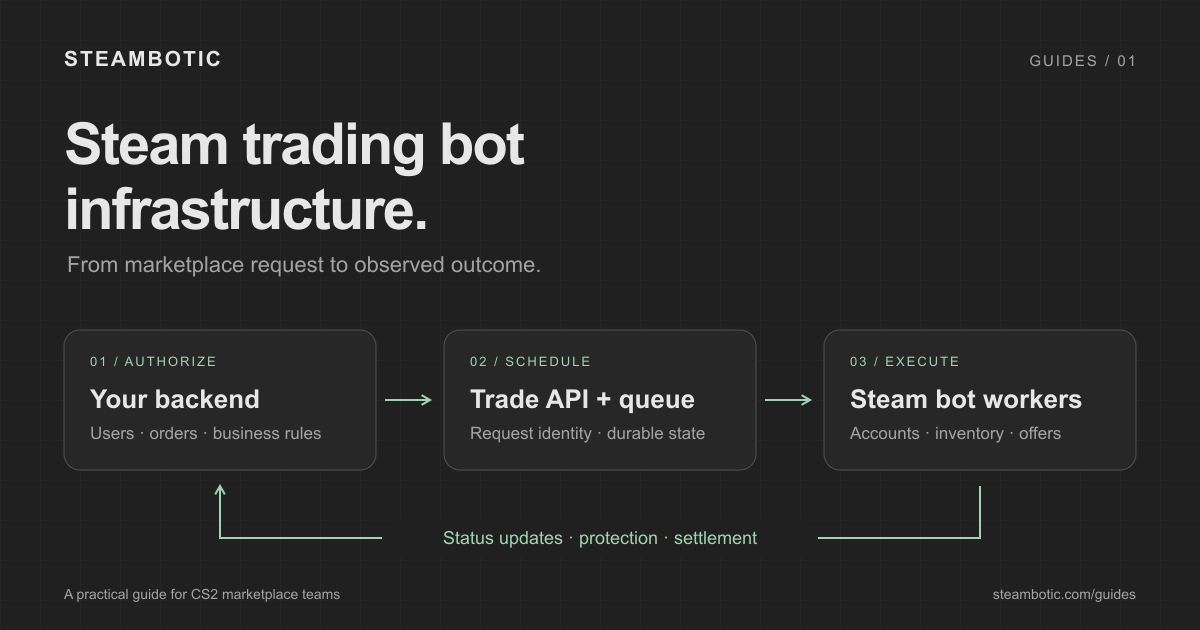
A production design needs more than a long-running bot process. These components can share a host at small scale, but their responsibilities should remain clear:
- Marketplace backend. Authenticates the user, verifies the intended partner, authorizes the transfer and records the business operation before submitting it.
- Trade API and durable queue. Validates requests, stores their identity and schedules work. A restart should leave enough evidence to recover an operation whose outcome is still unknown.
- Bot workers. Maintain account sessions, read inventory and execute Steam operations. Coordinate work for each account so simultaneous actions do not compete for the same items.
- Database and event delivery. Preserve requests, offers and observed settlement state, then deliver authenticated updates to your backend.
- Monitoring and recovery. Detect stale inventory, blocked work, unavailable accounts and delayed callbacks. Provide an operator with the identifiers needed to investigate.
Back up durable state and test restoring it. If you run multiple workers, decide how a bot is assigned to one worker and how ownership changes after a failure. Starting a second process against the same account without coordination can create conflicting actions.
Polling is also part of normal operation. The Steam TradeOfferManager polling documentation explains how that library observes offer changes and retains polling data. Use the persistence and recovery behavior of your chosen runtime deliberately.
Protect accounts, sessions and API access
Treat account passwords, session material and authenticator secrets as sensitive credentials. Transfer them through the agreed secure onboarding process, encrypt stored secrets, and keep encryption keys separate from encrypted account records. Restrict who can read backups and logs as well as who can open the dashboard.
Keep the marketplace’s bot API credentials on the server. A public web app should ask your backend to authorize a withdrawal; it should not receive a bot administration token. Use scoped keys, revoke unused access and define an operator recovery procedure before the first customer deposit.
A Steam Web API key is not a substitute for an authenticated bot session. Mobile confirmation and the trading partner’s acceptance are separate steps. SteamBotic’s create flow handles the bot’s mobile Steam Guard confirmation, while the partner still needs to accept. See the confirmation and offer-action behavior for recovery details and limitations.
Network access should be stable and observable. Monitor connection failures and expired proxy credentials. A private proxy is an infrastructure choice; it does not make an account exempt from Steam restrictions or guarantee trading availability.
Keep inventory usable without overwhelming Steam
Your marketplace needs an answer to “can this item be sent now?” as well as “does this bot hold it?” An item may be visible in inventory while protected, untradable or reserved for another offer. Store availability separately from item metadata and price estimates.
Before creating a withdrawal, check availability and reserve the selected assets as part of a coordinated operation. If two requests target the same skin, only one should acquire that reservation. After a timeout, keep the item unavailable until the original outcome is resolved; an HTTP timeout does not prove the offer was never sent.
Serve inventory views from a maintained snapshot instead of having every page view trigger a Steam read. SteamBotic exposes a sendable-inventory snapshot and WebSocket updates. Reconnect with a fresh snapshot so missed changes do not leave your local view incomplete. An item disappearing from that pool is not evidence that a trade settled.
Handle rate limits centrally. When an API supplies Retry-After, wait for that interval before retrying, and add jitter to avoid synchronized bursts. Reduce polling during sustained refusals. Do not assume that adding workers increases what the same Steam account or network path can do.
Make retries refer to the same operation
Consider a withdrawal request whose HTTP response is lost. Steam may already have received the offer. Immediately submitting a new operation creates a risk of sending another trade, even though your application saw a timeout.
Assign a durable operation ID before the first submission. With SteamBotic, save the UUID used as the Idempotency-Key and retry an uncertain HTTP submission with the same bot, route, key and payload. A different key or bot represents a different operation. Use a new key for an intentional new action, such as cancellation.
Example: a withdrawal times out. Your backend stores withdrawal W-104 and its request key, then submits the offer. The connection drops. Reload W-104 from storage, look up the original request, and retry only with its original identity if needed. Do not release its reserved skin or silently reroute the withdrawal to another bot while its outcome is unknown.
Keep these identifiers distinct: your business operation, the API request, the service’s stored offer and Steam’s trade offer. They let you join logs, callbacks and support investigations without guessing from item names or timestamps.
An HTTP 202 means the request was accepted for processing. Request success means that operation succeeded; it does not prove partner acceptance or final settlement. The request tracking and retry reference covers the exact response fields.
Separate request success, acceptance and settlement
Your backend should track three things independently: the requested action, the Steam offer state, and the exchange’s settlement state. A bot can successfully create an offer that the partner later declines. An accepted CS2 trade can still be inside its protection period.
Valve’s Trade Protected Items FAQ says CS2 items received in a trade are protected for seven days. During that period, they cannot be transferred, consumed or modified, and eligible recent trades can be reversed. These rules are separate from Steam trade and market holds.
Design your credit, withdrawal and reversal policies around those states. If you offer provisional credit, record that decision explicitly. A protection deadline passing is not, on its own, a fresh observation of settlement. Use the provider’s verified settlement update and keep financial state separate from whether an item is currently sendable.
Build a receiver that can handle repeat deliveries
Authenticate a webhook before letting it change your records. SteamBotic signs the delivery timestamp, a literal dot and the raw body using HMAC-SHA256. Verify the signature and delivery timestamp, validate the event, then persist it before acknowledging it. Re-encoding parsed JSON changes the bytes used for verification.
Callbacks can be repeated or arrive out of order. Deduplicate by eventId in durable storage and apply business effects transactionally with your processing marker. Keep offer and settlement revision watermarks separately: a newer offer update does not necessarily contain a replacement settlement snapshot.
The signed webhook reference includes event examples. If a callback is delayed, query the stored state and investigate delivery health. Missing delivery is not proof that the trade failed, and cancellation can race with acceptance.
A launch checklist for your first bot
Start with controlled trades and a small fleet. Increase capacity after the full lifecycle works, including recovery. Use this checklist for your integration review:
- Access: server-side keys have the required scope; revoked or unauthorized keys cannot submit trades.
- Inventory: protected and reserved assets cannot be selected as available stock; reconnecting refreshes the snapshot.
- Trade direction: deposits request the partner’s items; withdrawals give the bot’s items; the partner identity is verified.
- Retries: a lost response and a worker restart preserve the same operation identity and do not trigger a replacement transfer.
- Callbacks: tampered payloads are rejected; duplicates and reversed-order events produce the correct single business effect.
- Settlement: request success, acceptance, protection, completion and reversal are handled as distinct facts.
- Operations: alerts cover queue age, unavailable bots, stale inventory, overdue checks and webhook delivery failures.
- Recovery: backups can be restored and an operator can investigate a trade from its saved identifiers.
A healthy process is only the first signal. Measure whether bots can reach Steam, how old their last successful reads are, and whether trade outcomes reach your application. Those observations tell you more about operating readiness than a dashboard’s online badge.
Connect the infrastructure to your marketplace
SteamBotic brings the bot dashboard, trade API, inventory views and status callbacks into one service. Your marketplace remains responsible for user authorization, business records and deciding when funds or items become available to a customer.
If you are starting the integration, use the create-offer examples alongside this checklist. If you are deciding what to operate yourself, compare Hosting, Managed and On-premises and review the bot management capabilities against your requirements.
Sources and further reading
Steam rules checked on 13 October 2026. Product-specific behavior follows the SteamBotic API documentation; the architecture checklist is integration guidance.
- Valve: Trade Protected Items — Current CS2 protection and reversal rules.
- Valve: Steam Trade and Market Holds — Holds and Steam Guard context.
- Steam TradeOfferManager: polling — Offer observation and persistent polling data for this library.
Put your first bot to work.
Choose what you want to run yourself, and where you want help with the infrastructure.